
What is the Known Customers List?
Known Customers is part of our suppression features. The suppression feature is a list of contacts to whom you do not wish to send communications, either because you are already familiar with them or because sending to these contacts could harm your reputation and delivery rates.
The Known Customers function is designed for individuals you are already familiar with, allowing you to avoid spending an ID on these contacts. Additionally, they do not get sent to your marketing platforms.
Examples are:
- Active customers/donors
- Employees
- Vendors
- Franchisees
- Distributors
- Or other groups you do not want to identify.
What are the benefits of this feature? Why use Known Customers?
These are tracked, but there is no cost to these identifications. Additionally, they do not get sent to your marketing platforms.
The Known Customers function will also automatically connect, reconcile, and present the email addresses you already have on file.

How to upload your Known Customers and Associates List.
Step 1.
From your IDEX Pro Dashboard, go to ‘Configuration-> Known Customers.’

Step 2:
When uploading to your Known Customers List, you can add the email address itself, or upload a hash file. Select ‘Actions‘ to add your email addresses in the drop-down menu.

You can add an email address or a hash file with the Add Addresses or Upload Suppression List. For this example, we will be manually adding the addresses.
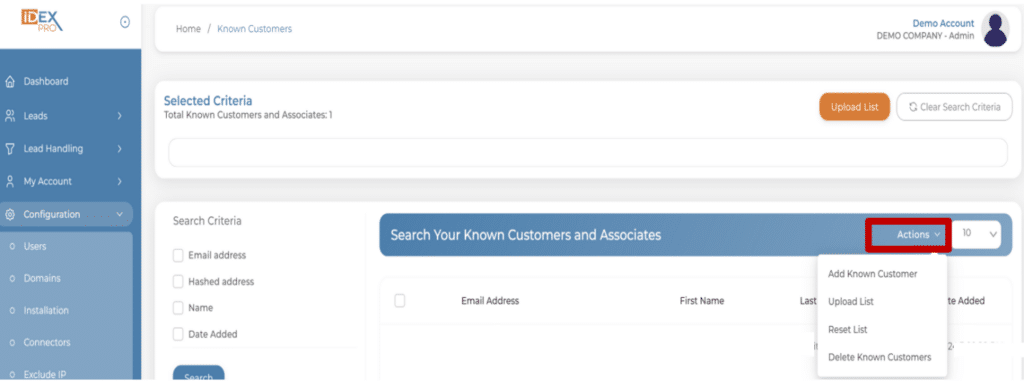
Step 3 When Selecting Add Known Customer:
Input your hash file or email address and select ‘Add Customer.’

Step 3 When Choosing Upload a List:
Select ‘Upload List’ and choose your file, then select Upload.
NOTE: This file MUST be a CSV with headers.
You can find an example template in your Upload Known Customers screen.

You’re done!
Once you’ve input your addresses and/or hash files, your list will be updated, and nothing else needs to be done. You should see your added contacts on your screen.

Can this process be automated?
Yes. This process can be automated.
Automation is an advanced technical process that IDEX Pro does not have documented. It can be completed entirely by a customer with sufficient technical knowledge, or IDEX Pro can set up the automation for a one-time fee.
If I automate, will it send emails already in my list?
No need to worry about duplicate emails; the system handles them automatically.
Where can I set this up?
You can find the Known Customers feature in your Configuration Tab.
How do I set this up?
Continue reading this article to find step-by-step instructions.
Why can’t I add more than 100,000 at a time?
This is a browser limitation.